
I install Sentinel
Assemble the sensors, connect the PoE cable, set up the network and sensors, and make sure the first data arrives. Open the installation guide
I install Sentinel
Assemble the sensors, connect the PoE cable, set up the network and sensors, and make sure the first data arrives. Open the installation guide
I configure settings and alarms
Name sensors, set alarm limits, digital inputs, outputs, rules, and Modbus sources. Start with first configuration
I manage the gateway
Set up the data center gateway: DHCP, NTP, local broker, bridge to Celestian, and OTA server. Open the gateway guide
I integrate over MQTT
Topics, SenFlat and SenML payload formats, configuration, commands, and alarm events. Open the MQTT reference
Sensors in one node
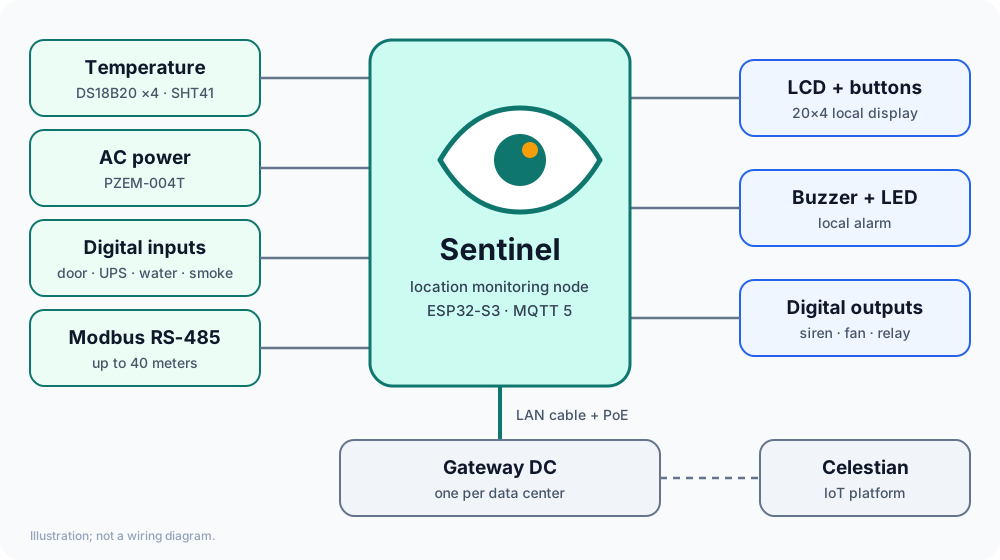
Four DS18B20 temperatures, AC power (PZEM-004T), temperature and humidity (SHT41), four digital inputs, and four digital outputs.
Alarms that keep working when the WAN is down
Warnings and alarms are computed on the node: buzzer, LCD, and events to the server, with delay and hysteresis.
Rules on the device
Input, condition, then output, event, or LCD text. Supports expressions, flags, and schedules, without waiting for the server.
Dozens of Modbus meters
Read up to 40 RS-485 devices (SDM120, PZEM-016, and your own profiles) as ordinary metrics.
Remote configuration and firmware
Configure everything from Celestian or the web interface, and install firmware over OTA with automatic rollback.
One gateway per data center
Credential-free nodes: the gateway provides IP, clock, broker, and firmware, then forwards data to Celestian.