
Hardware
Sentinel SNT-G1 is based on an ESP32-S3 module with W5500 Ethernet and PoE. Sensors and supporting modules connect to that module’s GPIO header.
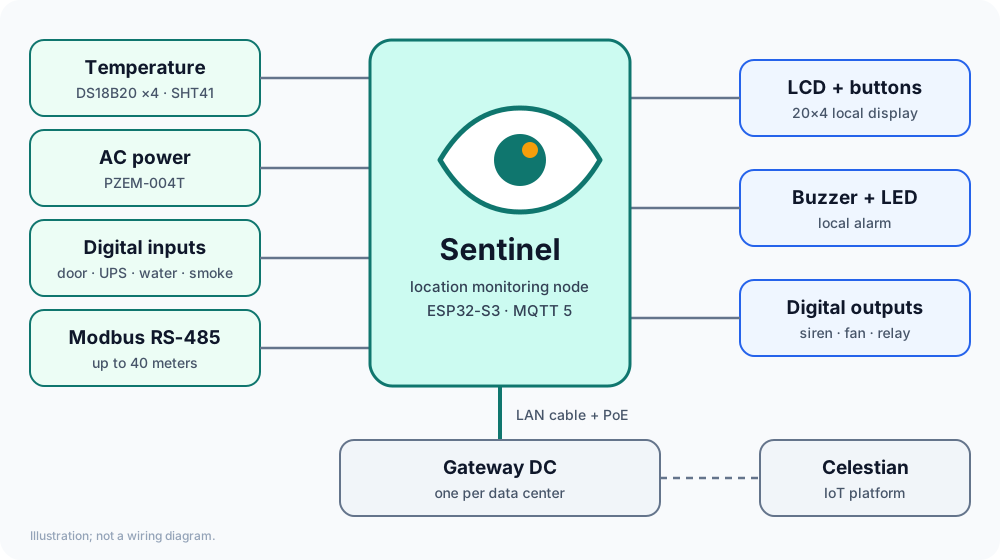
Modules and connections
Section titled “Modules and connections”| Module | Function | Connection to ESP32-S3-ETH |
|---|---|---|
| ESP32-S3-ETH + PoE | Controller, W5500 Ethernet, power from PoE | GPIO9–14 used by the W5500 |
| PZEM-004T 100A | Voltage, current, power, energy, frequency, power factor | GPIO17 (RX) / GPIO18 (TX) through a level shifter |
| DS18B20 (1–4) | Temperature, slots t1…t4; several sensors share one cable |
GPIO3, 4.7 kΩ pull-up to 3V3 |
| SHT41 (optional) | Room temperature and humidity | I2C GPIO1 (SDA) / GPIO2 (SCL), 3.3 V side |
| LCD2004 I2C | 20×4 local display | same I2C, through a level shifter (the LCD runs at 5 V). Backpack address (usually 0x27) is auto-detected or set with lcd_addr |
| PCF8574 (I/O expander) | Touch buttons and digital outputs. I2C address exp_addr (default 0x21) |
I2C GPIO1 / GPIO2 directly (3.3 V side), INT to GPIO39 |
| Touch TTP223 ×4 | UP / DOWN / BACK / OK, output HIGH when touched | PCF8574 P4 / P5 / P6 / P7 |
Digital outputs o1…o4 |
Switched by the output command or rules; all OFF at boot |
PCF8574 P0 / P1 / P2 / P3 |
Digital inputs d1…d4 |
Type set by configuration | GPIO16 / GPIO38 / GPIO48 (through the UPS optocoupler) / GPIO15, the other wire to GND |
| Active buzzer | Local alarm and identify | GPIO46 (active-HIGH) |
| RS-485 module (optional) | Modbus RTU devices | TX GPIO43, RX GPIO44, DE/RE GPIO40 (see Modbus sources) |
Pins that must not be used: GPIO0 and 45 (strapping), 4–7 (SD card slot), 21 (onboard RGB LED), 33–37 (PSRAM).
Installation notes
Section titled “Installation notes”- I2C pull-ups. The total SDA and SCL pull-up on the bus must be between ±2 kΩ and ±5 kΩ (3.3 V), and only one pair. Many PCF8574 modules carry their own pull-ups, sometimes 1 kΩ; combined with other pull-ups the bus becomes too strong, the LCD is not detected, and a scan shows every address responding. Remove the pull-up resistors on the PCF8574 module if the bus already has pull-ups.
- TTP223 touch buttons cannot sense touch through a metal plate. For a metal enclosure, make a window with an acrylic or plastic panel.
- Grounding. GND may be connected to the metal enclosure at one point near the RJ45, preferably through 1 MΩ in parallel with 10 nF/2 kV.
- DS18B20 needs a 4.7 kΩ pull-up resistor to 3V3 on the data line. Without it, readings can be intermittent.
- PCF8574 outputs only sink current well: one pin sinks ±25 mA but sources only ±100 µA when high. A small LED can be driven directly; other loads need a transistor, optocoupler, or relay module (Digital outputs).
- RS-485. No isolation on the board; use an isolated RS-485 module, or make sure only devices with an isolated communication side are connected. Add 120 Ω termination at both ends of the bus.
I2C addresses
Section titled “I2C addresses”| Device | Address | Notes |
|---|---|---|
| PCF8574 (buttons + outputs) | 0x21 (A0 to VCC, A1 and A2 to GND) | exp_addr = 33. Not auto-detected; must match the A0…A2 pads on the module |
| LCD backpack | 0x27 or 0x3F | lcd_addr 0 = automatic; must not equal exp_addr |
| SHT41 | 0x44 | enable with sht41 = true |
The PCF8574 module address = 0x20 + (A2·4 + A1·2 + A0), where A = 1 if that pad goes to VCC. The serial commands i2cscan and i2cdiag show which addresses respond (USB serial).
Power supply
Section titled “Power supply”Sentinel G1 is powered from PoE over the Ethernet cable; when programming over USB-C, power comes from USB. Provide a PoE switch in the rack or a PoE injector.