
Telemetry groups
By default all metrics are sent together in one message every telemetry_interval_ms (10 seconds). With dozens of Modbus devices, messages get large and many rarely-changing values are sent along. Telemetry groups let each set of metrics be sent on its own schedule and thresholds.
Concepts
Section titled “Concepts”- Group: a set of metrics with the same send settings. Each metric is in exactly one group.
- Snapshot: when a group is due, all metrics of that group that have a value are sent, not only those that changed, with the same sample time.
- One round: all due groups are combined in one message (one
q); if it exceeds the size budget, it is split per group.
A group is triggered by any of:
- periodic:
interval_ssince the last send (always active, so it is also the longest silence); - change threshold: any member metric changes by more than its
deltarelative to the last sent value (limited bymin_s); - appearance / disappearance of a metric’s value;
on_change: a boolean metric changes.
Built-in groups
Section titled “Built-in groups”| Group | Contents | Priority | Default trigger |
|---|---|---|---|
alarm |
alarm_level, all alarm_* |
crit |
periodic + immediately on change. Only interval_s may be set; cannot be split |
io |
digital inputs, outputs, expander_ok, maintenance, rule states (rule_<id>), flags |
crit |
periodic |
temp |
DS18B20 temperatures, temp_ambient, humidity |
normal |
periodic; threshold from temp_report_delta_c |
power |
voltage, current, power_draw, energy, frequency, power_factor (PZEM-004T) |
normal |
periodic; threshold from power_report_delta_w |
system |
uptime, heap_free |
low |
periodic |
src |
Modbus source metrics that do not name a group |
normal |
periodic |
The tgroups message
Section titled “The tgroups message”Topic m/<workspace>/c/<channel>/<mac>/tgroups (retained, QoS 1); report on tgroups/reported; stored content on tgroups/current (reply to cmd get_tgroups). The message replaces the whole set.
{ "tgroups_ver": 3, "confirm_s": 60, "groups": [ {"id": "temp", "interval_s": 60}, {"id": "system", "interval_s": 300}, {"id": "rak1", "interval_s": 30, "min_s": 5, "prio": "normal"}, {"id": "rak2", "interval_s": 30, "min_s": 5}, {"id": "energi", "interval_s": 300, "prio": "low"} ]}An entry with a built-in id configures that built-in group; any other id creates a custom group.
| Property | Range | Default | Meaning |
|---|---|---|---|
id |
[a-z0-9_], 1–16 characters, first a letter |
required | group name; must not start with alarm_ |
en |
boolean | true |
false = group not sent (not applicable to alarm) |
interval_s |
0 or 5 … 3600 | 0 |
0 = follow telemetry_interval_ms |
min_s |
1 … 3600 | 2 |
minimum gap between sends triggered by a threshold or on_change; must not exceed the effective interval_s |
on_change |
boolean | false |
a changing boolean metric triggers a send |
prio |
crit, normal, low |
per table; normal for custom |
order when a message must be split |
delta_ch |
object channel id → number, max. 8 entries | empty | overrides the profile delta for members of this group |
Limits: 24 custom groups, message max. 4096 bytes. A property that does not apply or is out of range rejects only that entry, with the reason in rejected.
Membership: the group attribute on sources
Section titled “Membership: the group attribute on sources”Only sources can be members of custom groups. In the sources message, set "group": "rak1" on a source to put all its metrics in that group. group_ch puts specific channels in another group (e.g. slow energy in an energi group). A source that names a group that does not exist is reported in group_missing.
The pattern used for 8 racks per node: one group per rack (rak1 … rak8), plus one long-interval energi group for cumulative energy.
Change thresholds (delta)
Section titled “Change thresholds (delta)”A threshold is set per metric, in the metric’s own unit (an absolute difference, not a percentage). A metric triggers when |current value − last sent value| ≥ delta. 0 or absent = no threshold. Boolean metrics do not use delta (their trigger is on_change).
Order of determination for source metrics, from the winner:
deltason the source ("deltas": {"t": 0.1}) ordeltaon inlineregs;delta_chon its group ("delta_ch": {"t": 0.2, "v": 1}), matched by profile channel id;deltaon the channel in the profile;- no threshold.
Built-in metrics use the keys temp_report_delta_c (temperature, °C) and power_report_delta_w (power, W).
One trigger is enough: when triggered, a snapshot of the whole group is sent and the last-sent value is updated for all members that went along. A metric without delta never triggers an initial send; its group is still sent periodically.
Starting values on the built-in profiles (for meters in a rack; tune per installation):
| Channel | SDM120 | PZEM-016 |
|---|---|---|
voltage v |
2 V | 2 V |
current i |
0.5 A | 0.5 A |
power p |
20 W | 20 W |
power factor pf |
0.05 | 0.05 |
frequency f |
0.5 Hz | 0.5 Hz |
| cumulative energy | no threshold | no threshold |
The tgroups/reported report
Section titled “The tgroups/reported report”Published on connect, when a set is applied, rejected, or cancelled, and on cmd get_tgroups; not periodic.
| Field | Meaning |
|---|---|
tgroups_ver, hash, bytes, previous_hash |
like rules |
count, rejected |
number loaded and the rejection reasons per entry |
effective[] |
effective values of every group (built-in and custom): interval_s, min_s, prio, delta_ch, members (metrics that have a value now), src_declared (source metrics declared, with or without a value), sends, causes |
causes |
periodic, delta, on_change, appear, gone, forced; the total can exceed sends because one send can have several causes |
group_missing |
sources that name a group that does not exist |
limits |
max_groups, max_delta_ch, max_bytes, interval ranges, confirm_s_min/max |
The server can flag a metric “stale” when there is no point for more than 2 × the group’s effective interval_s.
Applying
Section titled “Applying”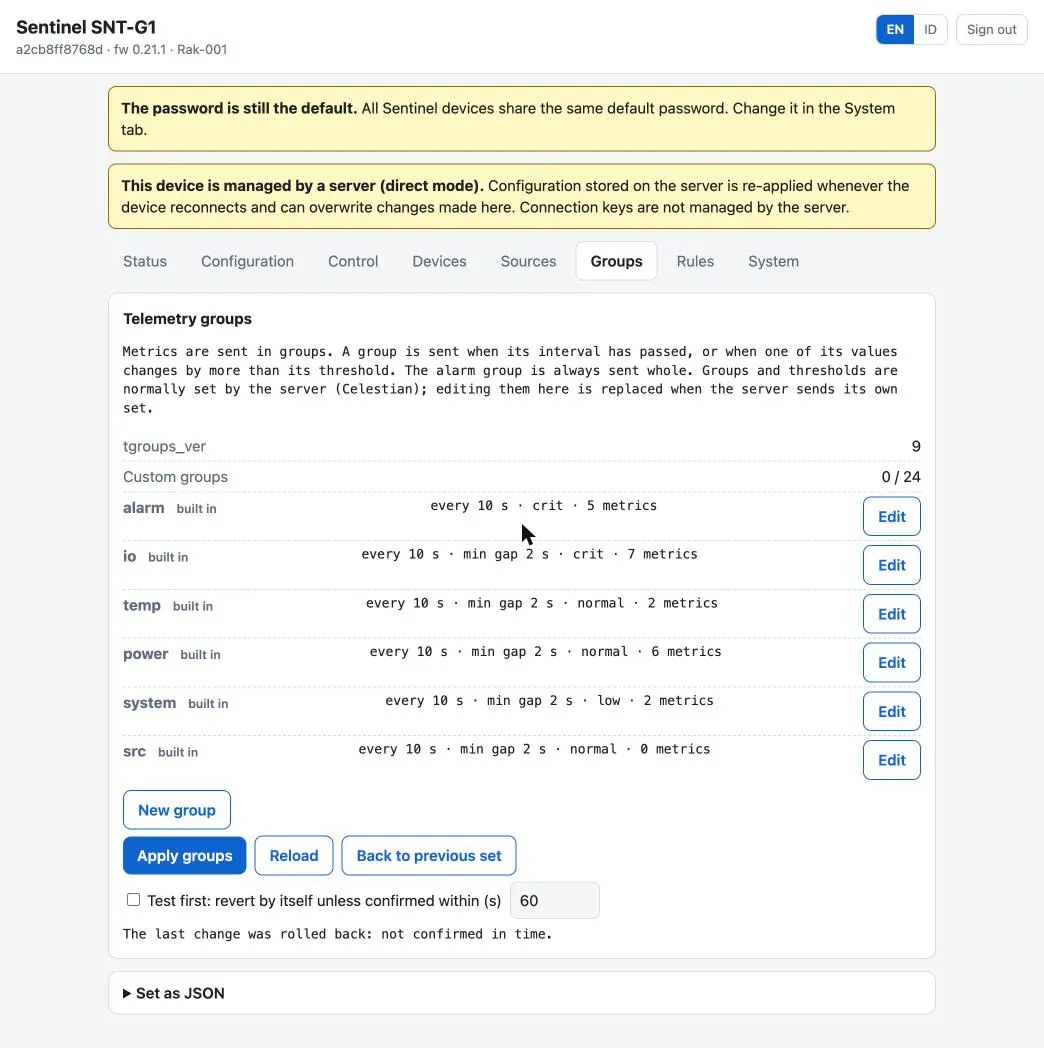
Same as rules and sources: confirm_s (30 … 3600), cmd tgroups_confirm, cmd tgroups_rollback, cmd get_tgroups.
python3 Tools/celestianctl.py tgroups <mac> --file tgroups.json --confirm-s 120python3 Tools/celestianctl.py tgroups <mac> --confirm <hash>python3 Tools/celestianctl.py tgroups <mac> --getpython3 Tools/celestianctl.py tgroups <mac> --clear # back to built-in groupsIn the web, the Groups tab provides a group table, a form, a JSON mode, and an Apply groups button with confirm_s testing. The per-source Group, Channel groups, and Channel thresholds fields are in the Sources tab.
The gateway bridge must forward +/tgroups, +/tgroups/reported, and +/tgroups/current (Bridge to Celestian).