
Modbus sources
Sentinel can be a Modbus RTU master over RS-485 and read up to 40 devices (power meters, temperature and humidity transmitters, and the like). Every register read becomes an ordinary metric in telemetry, events, and rules.
RS-485 hardware
Section titled “RS-485 hardware”| Matter | Contents |
|---|---|
| SNT-G1 pins | TX GPIO43, RX GPIO44, DE/RE GPIO40 (direction via RTS). The built-in PZEM-004T uses a different UART, so no clash |
| Transceiver | an isolated RS-485 module. An auto-direction module without a DE pin also works (DE not connected). The board has no RS-485 isolation of its own |
| Wiring | A, B, and GND to the device. Do not connect a device module’s +5V pin (e.g. PZEM-016) to Sentinel’s supply; connect only A, B, and GND |
| Bus | 120 Ω termination at both ends; bias at one point for long buses |
| DE at boot | add a 10 kΩ pull-down on DE so the boot log does not enter the bus |
How it works
Section titled “How it works”An installation uses two things:
- Device profile: the register map of one device type (e.g. Eastron SDM120). See Modbus profiles. Sentinel ships built-in profiles for the Eastron SDM120 and Peacefair PZEM-016.
- Source: one installation of a device (address, name prefix) that references a profile.
The metric name in telemetry = <prefix>_<suffix>, e.g. prefix rak1 with suffix voltage becomes rak1_voltage.
The sources message
Section titled “The sources message”Topic m/<workspace>/c/<channel>/<mac>/sources (retained, QoS 1). The message replaces the whole set.
{ "sources_ver": 1, "buses": [{"id": "uart1", "type": "modbus_rtu", "baud": 9600, "parity": "N", "stop": 1}], "sources": [ {"id": "grid", "driver": "modbus", "profile": "eastron-sdm120", "pv": 1, "addr": 1, "prefix": "grid", "label": "Meter utama"}, {"id": "rak1", "driver": "modbus", "profile": "eastron-sdm120", "pv": 1, "addr": 2, "prefix": "rak1_pdu", "label": "Meter rak 1"} ]}| Source field | Meaning |
|---|---|
id |
fixed for life, [a-z][a-z0-9_]{0,11}, unique. Changing the id = a new source |
driver |
modbus |
profile, pv |
profile id and its version (the installation pins the version, so updating a profile does not change a running node without a new sources message) |
addr |
Modbus slave address 1…247, unique on the bus |
prefix |
metric name prefix (default id). Use short names (2–6 characters); see Capacity |
label |
max. 12 characters, for display |
interval_s, timeout_ms, retries |
override the profile’s poll values |
en |
false = not read |
group, group_ch, deltas |
telemetry group and thresholds (Telemetry groups) |
names |
rename metrics per channel |
buses holds the uart1 bus settings: baud 1200…115200, parity N/E/O, stop 1/2. One bus, one setting: devices with different baud rates cannot share a bus. The bus is always named uart1 in the message (a logical name).
A source may also use inline regs (without a profile) for one-off devices, with ch, fn (1–4), reg (zero-based), type (u16, s16, u32, s32, f32, bit), words/bytes (order), scale, offset, name, unit, dec.
Limits
Section titled “Limits”| Limit | Value |
|---|---|
| Sources | 40 |
| Source metrics | 400 |
| Registers per source | 16 |
sources message size |
G1 6144 B |
A source that exceeds a limit is rejected (melebihi batas metrik); other sources are still loaded. A message that is wholly invalid is rejected and the old set keeps running.
Adding a source from the web
Section titled “Adding a source from the web”The Sources tab in the web interface: choose a profile, fill in the address and prefix, and the page shows the metric names that will be created along with their units and kinds. The page rejects up front source names, prefixes, addresses, or metric names the node would certainly reject. The Devices tab monitors the status of each source.
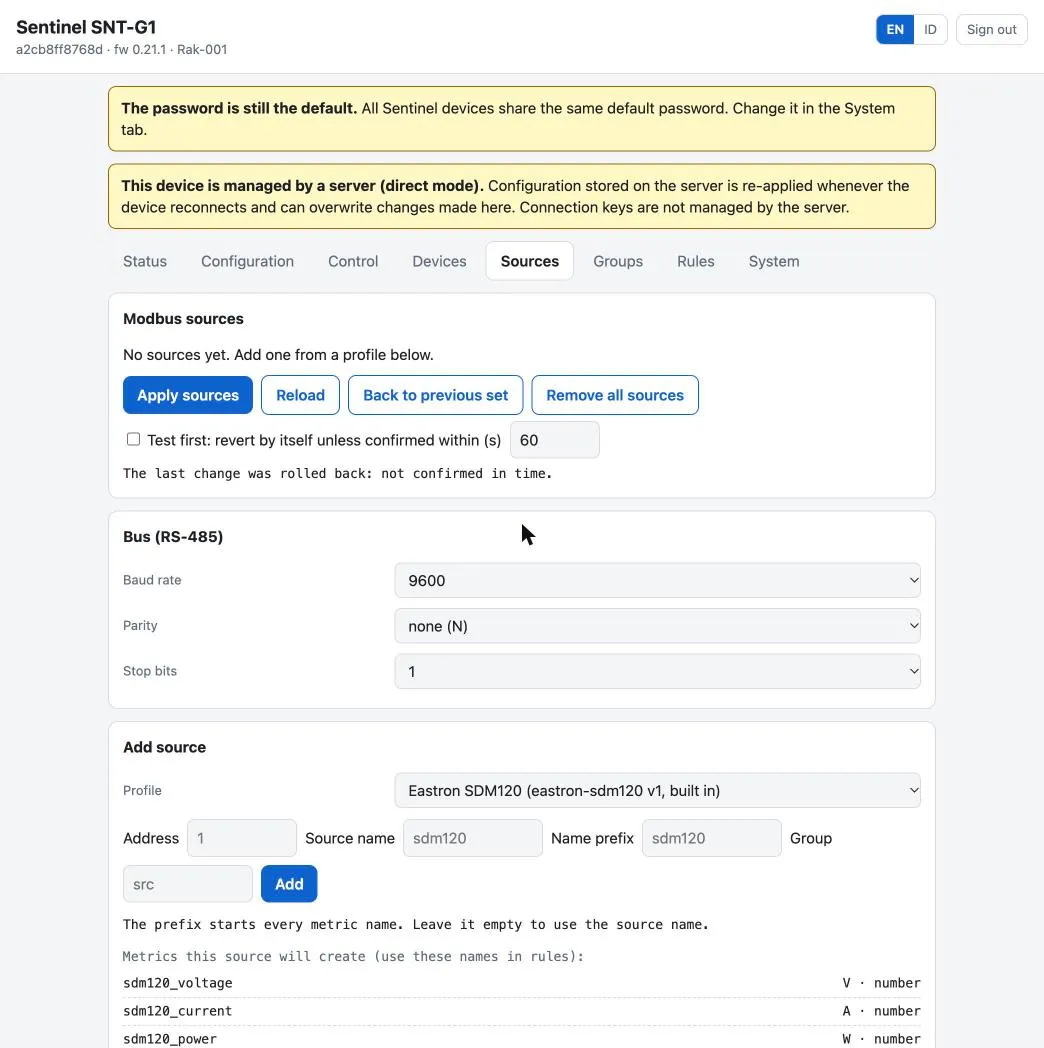
From a terminal:
python3 Tools/celestianctl.py sources <mac> --file Tools/sources-contoh-profil.jsonpython3 Tools/celestianctl.py profiles <mac> --sources Tools/sources-contoh-profil.jsonThe second command sends the node the profiles referenced by the sources file, from the library.
Status per source
Section titled “Status per source”| Status | Meaning and checks |
|---|---|
ok |
answers and its data is fresh |
no_response |
A/B wires swapped → slave address → baud/parity → 120 Ω termination → register address 0- or 1-based |
crc_error |
usually noise or parity |
bad_data |
response does not match the profile |
bus_fault |
bus problem |
disabled |
en = false |
bad_config |
invalid source configuration |
Repeated failures back off progressively (interval × 2ⁿ, max. 60 seconds) and do not hold up other sources. A metric whose value is stale (older than three times the interval) is not sent. Per-source diagnostics: sources/reported (not periodic; published on connect and when the set changes).
Applying with confirmation
Section titled “Applying with confirmation”A wrong bus parameter (baud) makes all sources silent without a clear sign, so sources (and profiles) support confirm_s like rules: the set runs temporarily, cmd sources_confirm with the hash makes it permanent, and without confirmation the node returns to the old set. cmd sources_rollback cancels the pending set or returns to the previous set; cmd get_sources downloads the effective set (…/sources/current).
python3 Tools/celestianctl.py sources <mac> --file sources.json --confirm-s 120python3 Tools/celestianctl.py sources <mac> --confirm 8a3030f6python3 Tools/celestianctl.py sources <mac> --rollbackMetric name: lowercase letters, digits, _; starts with a letter; max. 24 characters; unique among all node metrics including built-in sensors; must not start with alarm_, rule_, src_, flag_ or be a fixed name like voltage. The source prefix makes Modbus metrics different from the built-in PZEM-004T voltage, power_draw, ….
Built-in alarms (volt_min_v, power_max_w) are only for the PZEM-004T. Alarms for Modbus meters are made with rules, e.g. {"src":"rak1_pdu_power","op":">","v":3500,"hyst":100}.
Modbus source metrics do not yet appear on the LCD; see the web Devices tab or Celestian.